October 3rd marks the first day of renewal season for members who have memberships that expire on January 1 each year. Each year, ACI HQ works hard to help assist you with renewing your international, local, affiliate and Intra-Club memberships.
Here’s a step-by-step guide on how to renew your membership online and even set it for Auto Renew so you can set it and — well, let’s not say forget it — but instead continue to enjoy it year after year without the hassle of manual renewal!
Step 1: Log in to AirstreamClub.org
Your membership will be open for renewal 90 days before the expiration date. To easily renew online, log in to AirstreamClub.org. After you log in, click the link in the banner at the top of your Membership Dashboard page or click Membership Information under Popular Links.

Clicking on either link will bring you to the renewal screen.
Step 2: Confirm Your Personal Information (and Select Auto Renew!)
You’ll see the online renewal form. Review the information to make sure it’s all correct. If there are any changes needed, please click on “Personal Information” on the left side navigation and update that information first. Then you can come back and complete the renewal process.

At the bottom you’ll see a check box to opt in to Auto Renew. After you complete the renewal process this year, your membership will then auto-renew each year using the payment method you select this year. You will be notified each year prior to the renewal taking place, just so you can review and make sure everything is still accurate before the renewal is charged. Otherwise, no action will be necessary each year for you to continue to enjoy your membership.
Then click Next Page to review your BRNs.
Step 3: Review Your BRNs
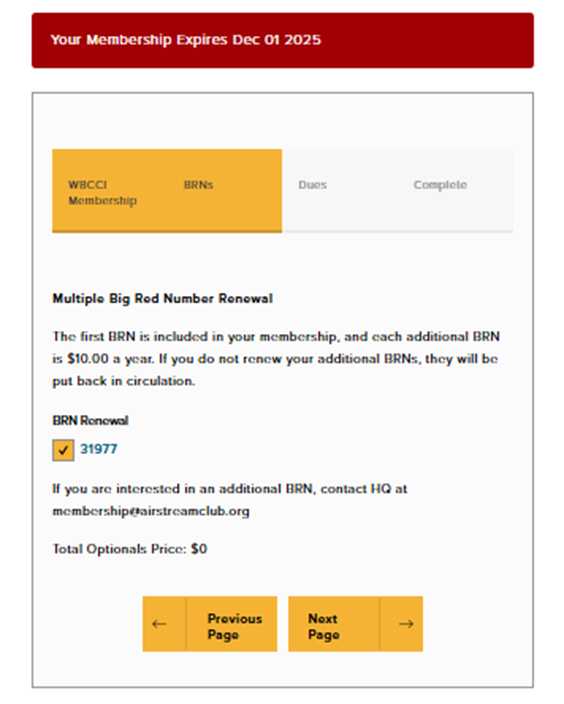
You will see a listing of your current BRNs.
Confirm your BRN(s) and proceed to the next page by clicking Next Page.
Step 4: Review Your Club Memberships & Dues
Next members will see club membership information, including local home club, affiliate and Intra-Club memberships. Their current club memberships will be listed in the boxes below each category heading. They may choose to:
- Renew their current club memberships as is (leave the content in the boxes alone)
- Add or change clubs by clicking the down arrow or “Click here to add affiliate clubs” or “Select Some Options” to see the list of clubs. They will see the associated dues for each club in that list.
- Remove clubs by clicking the X next to the club name.

Then click Submit to move to the final screen and complete your renewal.
Step 5: Complete Renewal and Submit Payment
To complete your renewal, you can pay by credit card or by ACH (bank transfer).
- Credit card payments will be charged a 3% convenience fee, but are processed immediately.
- ACH payments may take 3-5 business days to process.

After selecting your payment method preference, you will click Submit. This will take you to the payment processing page.

The screen shot above shows a member who chose to turn on Auto Renew. If you choose to just renew without adding Auto Renew, the blue button will simply say “Pay”.
Credit Card Payments
To pay by credit card, you’ll need to enter your card information, including the CVC code on the back and your zip code. You will see the 3% credit card convenience fee listed in the breakdown of charges.
ACH Payments
To make a payment via ACH, you have two options:
Option 1: Logging in to Your Account
- This is not available with all banks.
- If your bank allows this, you will simply follow the instructions on screen to complete your payment.
Option 2: Entering Your Bank Details Manually
- You will need your Bank Routing Number and your Account Number.
- After you enter your bank details, you will receive an email from support@stripe.com with instructions on how to complete your payment.
- You will need to verify your account through a “micro-deposit” verification process. The email from Stripe will have instructions on how to do this:

When you log in to your bank account online, you will see a deposit from Wally Byam Caravan Club for $0.01 in your account. It will have a 6-digit verification code starting with SM in the record. You’ll go to Stripe’s verification page (link will be in the email from Stripe) and enter the micro-deposit verification code to complete your transaction. If you fail to complete this step, your renewal will not be processed.
Step 6: Enjoy Another Year of Membership!
You have successfully renewed your Airstream Club International membership for another year! Enjoy the benefits, events and camaraderie of your Airstream community.
As always, if you have any questions or need assistance, please contact ACI Headquarters at 937-596-5211. We are always happy to help.
See you down the road!
Originally published: Sept. 23, 2025
Updated: Sept. 25, 2026